mirror of
https://github.com/ynput/ayon-core.git
synced 2025-12-24 21:04:40 +01:00

1.2 KiB
1.2 KiB
| id | title | sidebar_label |
|---|---|---|
| admin_hosts_aftereffects | AfterEffects Settings | AfterEffects |
import Tabs from '@theme/Tabs'; import TabItem from '@theme/TabItem';
AfterEffects settings
There is a couple of settings that could configure publishing process for AfterEffects. All of them are Project based, eg. each project could have different configuration.
Location: Settings > Project > AfterEffects
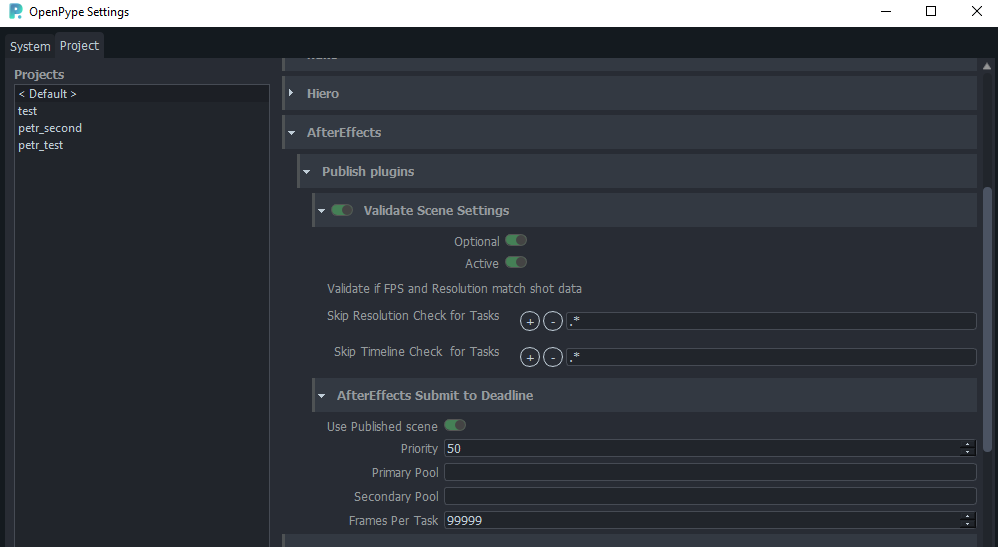
Publish plugins
Validate Scene Settings
Skip Resolution Check for Tasks
Set regex pattern(s) to look for in a Task name to skip resolution check against values from DB.
Skip Timeline Check for Tasks
Set regex pattern(s) to look for in a Task name to skip frameStart, frameEnd check against values from DB.
AfterEffects Submit to Deadline
Use Published scene- Set to True (green) when Deadline should take published scene as a source instead of uploaded local one.Priority- priority of job on farmPrimary Pool- here is list of pool fetched from server you can select from.Secondary PoolFrames Per Task- number of sequence division between individual tasks (chunks) making one job on farm.